Help Center / Renewal planning

Compare your totals with the certifying body's portal

Applies to: Pro, Team and Compliance · Last updated October 9, 2026

Record what the portal shows, and see exactly why it differs from your records.

Record a check

  1. Open the renewal cycle and select Record a check under Portal check.
  2. Enter the date you checked, the total the portal shows and any pending credits it lists. For ISC2, also enter the Group A and Group B totals.
  3. Add a note or a screenshot of the portal if you like. The screenshot is stored as the cycle’s evidence.
  4. Save. The newest check becomes the cycle’s recorded total.
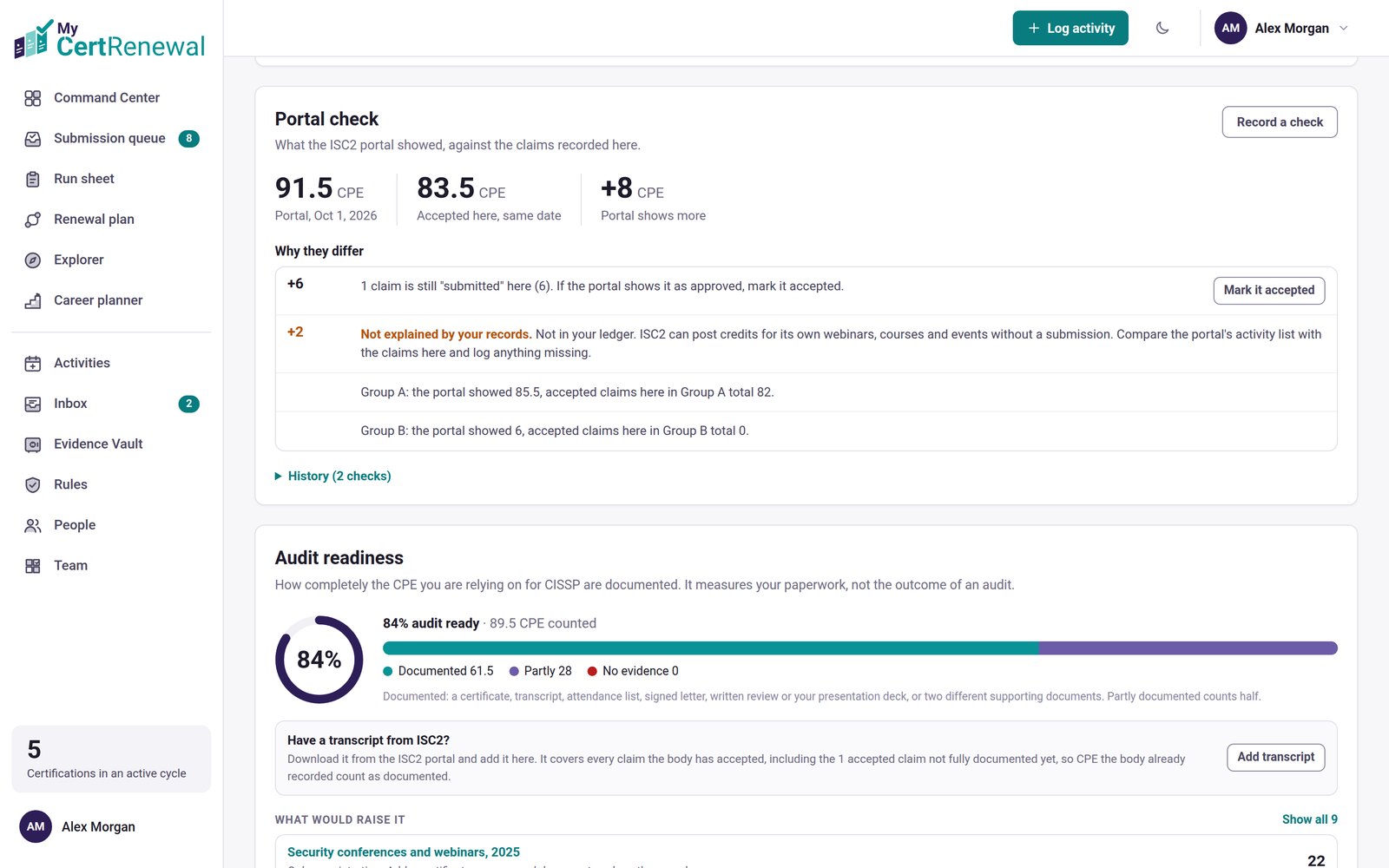
MyCertRenewal app screen: A portal total compared with the credit accepted here, with each part of the difference explained.
A portal total compared with the credit accepted here, with each part of the difference explained.

How the difference is explained

Only from your own records:

  • claims accepted after the date you checked
  • category limits the portal applies
  • claims still marked submitted (with a Mark accepted button)
  • claims dated outside the cycle
  • pending credits
  • for ISC2, the Group A and Group B split

Anything left over is labeled Not explained by your records, with a note on what that certifying body can post by itself. ISC2, CompTIA, EC-Council, ISACA and Cisco each have their own note.

Good to know

  • Works for any certifying body. You enter totals, not line items.
  • MyCertRenewal never signs in to the portal or imports from it.

Still stuck? Email [email protected] and tell us what you were trying to do.

Related articles

Your renewal cycles

What the statuses and labels mean

Add evidence: the audit package

Track it all in one place

MyCertRenewal lets you log an activity once and see the credit it earns at each certification it applies to. Start free with up to 2 certifications.

Certification renewal and CPE/CEU tracking for IT and security professionals who hold more than one certification. MyCertRenewal is a ConsultraCloud product.

MyCertRenewal is a ConsultraCloud product.

App screens show sample data. All trademarks belong to their respective owners. MyCertRenewal is not affiliated with or endorsed by ISC2, CompTIA, EC-Council, ISACA, Cisco, Credly, Amazon Web Services or Microsoft.

© 2026 ConsultraCloud. All rights reserved.