A spreadsheet is a perfectly good CPE tracker if you hold one or two certifications from one certifying body and log a handful of activities a year. Once you hold certifications from several bodies, the work changes. You stop just listing activities and start applying each body’s rules, caps and evidence requirements to every row. That is where an app starts to make sense.
If a spreadsheet suits you, the template below is ready to copy.
What any CPE tracker has to do
Whatever you use, it should answer five questions at any moment:
- How many credits do I still need for each certification, and by when?
- Which category or group does each activity fall under, at each certifying body?
- Have I hit a cap for any activity type this cycle?
- What have I submitted, and what has actually been accepted?
- Where is the proof for each claim if I am audited?
When a spreadsheet is enough
- You hold one certification, or several from the same certifying body.
- You log a few activities a year, mostly from one provider that posts credits for you.
- You don’t mind looking up the rules yourself each time.
- You keep proof in a folder you trust, with consistent file names.
ISC2 holders are well placed here. ISC2 typically awards one CPE credit per hour, and its Certification Maintenance Handbook says the Group A credits you submit are counted toward all your active ISC2 credentials with a relevant domain. One row per activity can cover all of them.
A spreadsheet template you can copy
One row per activity, plus one block of columns per certification:
| Column | What to enter |
|---|---|
| Date | Completion date. For multi-day events, ISC2 uses the end date to decide which cycle the activity falls in; other bodies need it completed inside the cycle |
| Activity and provider | Title and who ran it |
| Type | Webinar, conference, course, reading, teaching |
| Qualifying minutes | Educational time only, with breaks and meals taken out |
| Description | Two first-person lines, ready to paste into a portal |
| Per certification: category or group | For example Group A, ECO-aligned, Conference |
| Per certification: credits | Worked out under that body’s rule |
| Per certification: status | Planned, submitted, accepted, not eligible |
| Evidence file names | Certificate, agenda, registration |
Add a summary tab per certification with the cycle end date, the requirement, the accepted total and the gap. Keep accepted credit in its own column, separate from submitted credit. Otherwise the gap looks smaller than it is.
Where spreadsheets get hard
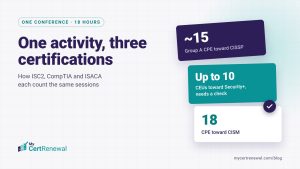
Trouble starts when one activity counts differently at each certifying body. Take one conference with 6.5 hours of sessions:
- ISACA counts 50 minutes as one CPE hour, so 390 minutes can count for 7.75 CPE hours (ISACA CPE Policy).
- ISC2 typically counts one CPE per hour, so about 6.5.
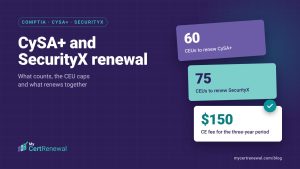
- CompTIA gives one CEU per hour attended, but only if at least 50% of the content relates to the exam objectives, so that credit needs a check. Conference CEUs are also capped at 10 per cycle for Security+ (CompTIA Training and Higher Education).
- EC-Council lists an education seminar, conference or event at 1 credit without saying per what, and awards no credit for events related to your job role (EC-Council CPE (ECE) Policy).
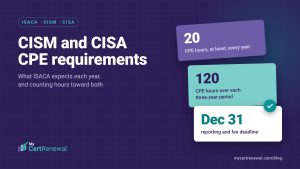
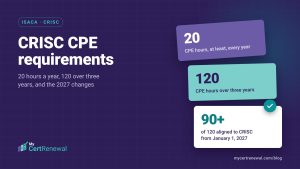
Then there is ISACA’s change from January 1, 2027: at least 90 of the 120 hours in a three-year cycle must align with the exam content outline, and up to 30 can come from other professional development (ISACA CPE 2027). Each of these rules means another column or formula. Every formula can break, and every one needs updating when a body changes its policy. Our post on CPE credits for multiple certifications walks through the counting in more detail.
Evidence is the other weak spot. A spreadsheet can hold a file name, but the file lives somewhere else, and nothing tells you a certificate is missing until you go looking for it.
What an app does differently
Our side-by-side comparison and features page cover MyCertRenewal in detail. The short version:
- Rules stored as data: credit is calculated from each body’s stored rules for ISC2, CompTIA, EC-Council and ISACA, with the reason for each number.
- Caps and group requirements are tracked against each cycle.
- Claim statuses: identified, planned, ready, submitted, accepted, or not eligible with the reason recorded.
- Evidence is attached to the activity once and shared by every claim it supports.
- Email reminders arrive before a cycle deadline while you are still short of credits.
Where an app falls short
- It is one more account to sign in to.
- A spreadsheet costs nothing at any size. The Free plan covers one person and up to 2 certifications; beyond that you need a paid plan.
- It is available in the United States and Canada only.
- It isn’t connected to any certifying body’s portal. You still enter each claim in each portal yourself.
- Coverage has limits. For Cisco’s CCNA, MyCertRenewal shows where an activity could count but no number. AWS certifications that renew by exam are tracked by expiry date, and Microsoft credentials can be recorded but have no renewal rules yet (see supported certifications).
- The certifying body still decides what it accepts. An app shows you the rules; it can’t change them.
Leaving is straightforward. Download my records gives you one ZIP with an Excel workbook of your credentials, cycles, activities, claims and files, the same tables as CSV, and every stored file. You can go back to a spreadsheet whenever you like.
A quick way to decide
Give yourself a point for each statement that is true:
- You hold certifications from two or more certifying bodies.
- You claim the same activity toward more than one certification.
- You have hit, or nearly hit, a cap or group limit.
- You have more than one renewal date in the next 18 months.
- You couldn’t find proof for last year’s activities within ten minutes.
Zero or one: keep the spreadsheet and use the template above. Two or more: an app is probably worth trying.
If you scored two or more, Start free and log your next activity alongside your spreadsheet. The Free plan covers one person and up to 2 certifications, with no card needed.
Frequently asked questions
Is a spreadsheet good enough to track CPE credits?
Yes, for many people. If you hold one or two certifications from one certifying body and log a few activities a year, a spreadsheet with dates, hours, categories, status and evidence file names works well.
Why do the same hours give different credit at different bodies?
Each certifying body sets its own rules. ISACA counts 50 minutes as one CPE hour, ISC2 typically counts one CPE per hour, and CompTIA gives one CEU per hour of a conference only if at least 50% of the content relates to the exam objectives, with a cap on conference CEUs per cycle.
Does MyCertRenewal submit my CPE credits?
No. MyCertRenewal isn’t connected to any certifying body’s portal. It prepares each claim, keeps the evidence attached, and you enter each claim in the portal yourself.
Can I export my records from MyCertRenewal to a spreadsheet?
Yes. Download my records gives you one ZIP with an Excel workbook of your credentials, renewal cycles, activities, claims and files, the same tables as CSV files, and every stored file.
Certification rules change. Always confirm current requirements with the certifying body. MyCertRenewal is not affiliated with or endorsed by ISC2, ISACA, CompTIA, EC-Council, Cisco, Amazon Web Services or Microsoft.