Applies to: All plans · Last updated October 8, 2026
Hold as reserve marks an activity you are keeping back in case you need it.
Mark an activity as reserve
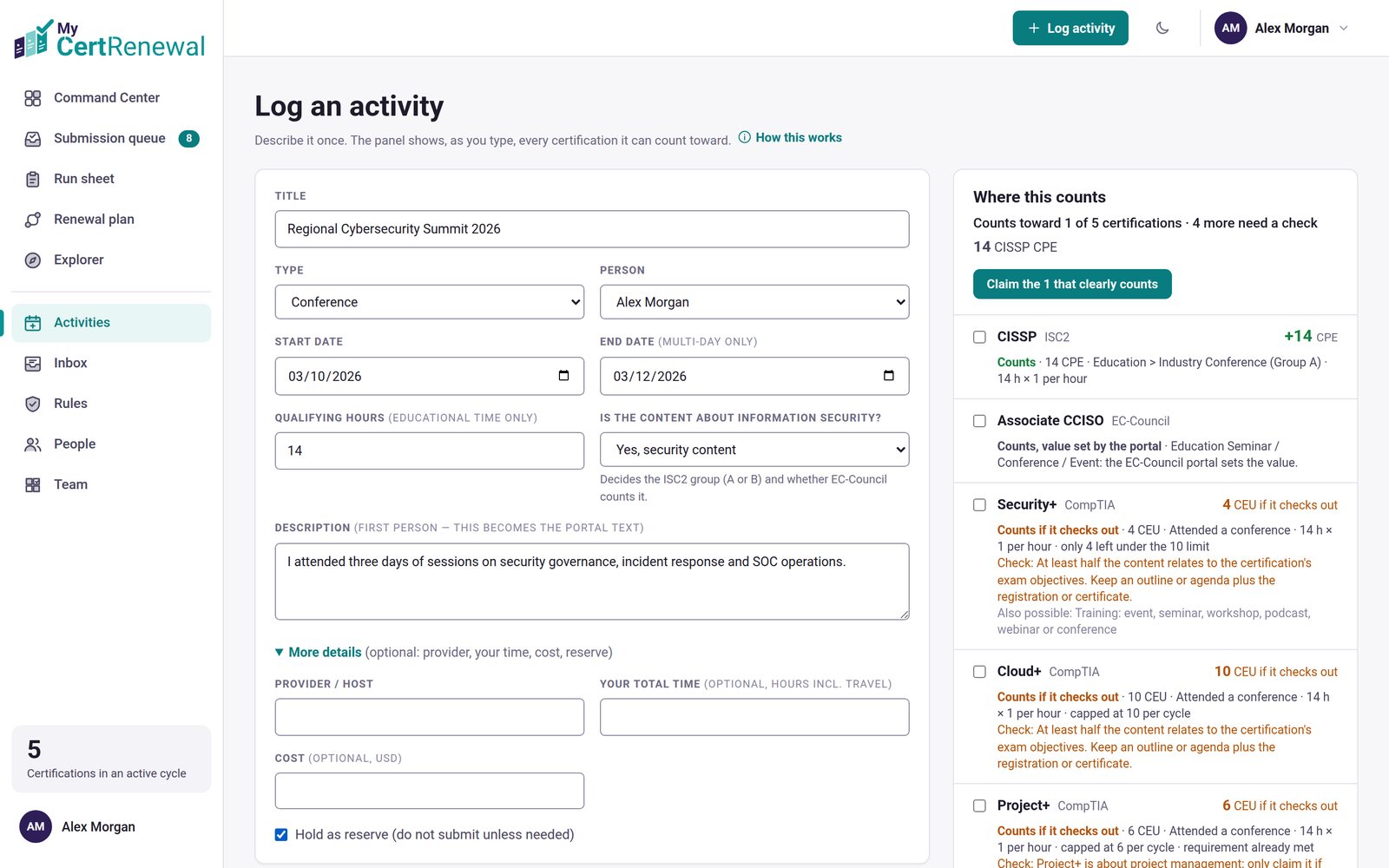
On Log activity, open More details.
Tick Hold as reserve (do not submit unless needed).
The activity gets a reserve tag. In the Activities list, the Include reserve activities box shows or hides them.
More details open on Log activity, with Hold as reserve ticked.
What it does and does not change
Hold as reserve does not change your totals by itself. What counts is each claim’s status. Leave a reserve activity’s claims as Identified so they stay out of Ready to file until you decide to use it. If you mark them Ready, they appear in the submission queue like any other claim.
Good to know
A reserve activity is useful when a cycle is already met, or when you want spare credit in case a claim is rejected.
Still stuck? Email [email protected] and tell us what you were trying to do.
Certification renewal and CPE/CEU tracking for IT and security professionals who hold more than one certification. MyCertRenewal is a ConsultraCloud product.
App screens show sample data. All trademarks belong to their respective owners. MyCertRenewal is not affiliated with or endorsed by ISC2, CompTIA, EC-Council, ISACA, Cisco, Credly, Amazon Web Services or Microsoft.